Matter Details
View details about Matter devices paired to your Hubitat Elevation hub
Matter Details
The Settings > Matter Details page shows you details about the Matter Fabric (collection of Matter devices) on your Hubitat Elevation hub.
Matter support is not available on hub models prior to model C-5, and this page will not appear on those hubs.
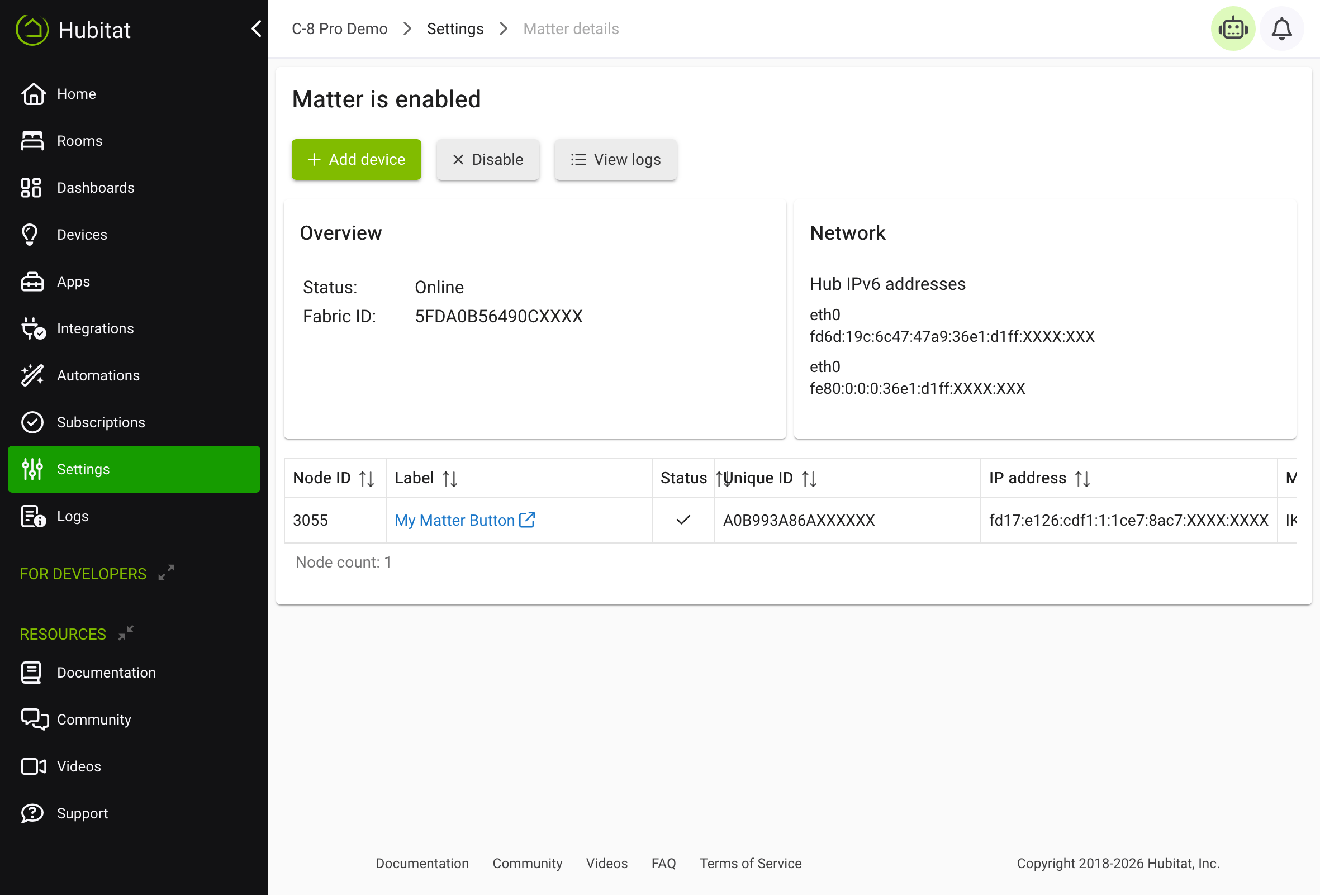
This page offers an advanced view of details about your Matter Fabric and Matter devices. It may be useful for troubleshooting; however, most users will not routinely need to use this page. For example, to add a Matter device to your hub, use the Add Device page.
Matter Fabric Options
You will see either an Enable or Disable button towards the top of this page (the Disable button is the configuration pictured above).
-
Enable: Enables Matter on this hub by either:
- installing Matter prerequisites on this hub if this is your first time enabling Matter on this hub (will take several minutes and require a reboot when finished; follow any on-screen prompts); or
- re-enabling Matter functionality on this hub if it was previously disabled
-
Disable: Disables Matter on this hub. Most of the below will be unavailable when disabled.
- View Logs: Shows "raw" Matter logs, typically useful only for advanced troubleshooting or development.
Matter Fabric Details
Overview
- Status: Normal status is Online
- Fabric ID: Unique identifier for this Matter Fabric
Network
- Hub IPv6 addresses: IPv6 addresses assigned to any network interfaces (Ethernet or Wi-Fi) in use by this hub
Matter Devices Table
Finally, a table of all Matter devices on your Hubitat Elevation Fabric will be listed. Details for each device include:
- Node ID: Unique ID for this device on this hub (this is not the same as the numeric Hubitat device ID; it does form part of the DNI, or device network ID)
- Label: The name or label (display name) of the device, as specified when joining the device; can be changed on the Device Detail page
- Status: Shows if the Matter device is believed to be online (checkmark) or offline (circle with "X")
- Unique ID: The node operational identifier, a 64-bit value uniquely identifying this node within the Fabric
- IP address: The IPv6 address of this device
- Manufacturer: The name of the manufacturer of this device
- Model: The model of this device
- Admin: Offers Get Setup Code button that can be used to generate pairing code to add device to another Matter controller.
Not all information may be available for all devices; the Unique ID, Manufacturer, and Model columns may be blank if the device did not respond with this information within the allotted time during pairing. This does not indicate a problem by itself.